Course Objectives
At end of course, learners will be able to apply techniques for image enhancement and produce optimal quality images for use in web-application images or print-application images..
Course Duration
16 Hours
Target Audience
For those who want to attain techniques for image enhancement and produce optimal quality images for use in web-application images or print-application images.
Pre-requisites
Basic computer knowledge is a must.
Certification
You will receive a Statement of Attainment from SkillsFuture Singapore after you pass the assessment.
Mode of Training
Classroom
In this course you will learn to apply techniques for image enhancement and produce optimal quality images for use in web-application images or print-application images.
| SECTION |
DESCRIPTION |
| Section 1 |
Image manipulation techniques |
| Section 2 |
Technical qualities and characteristics of digital files |
| Section 3 |
Privacy and intellectual property |
Entry Requirement
-
Minimal education qualification is at least 1 GCE ‘A’ level pass or 1 GCE ‘O’ Level pass or1 GCE ‘N’ Level or National ITE certificate(Nitec) or equivalent.
-
Speak, listen and read English at a proficiency level not lower than the WPL Level 5, and manipulate numbers at a not lower than the WPN Level 5.
-
Ability to do typing
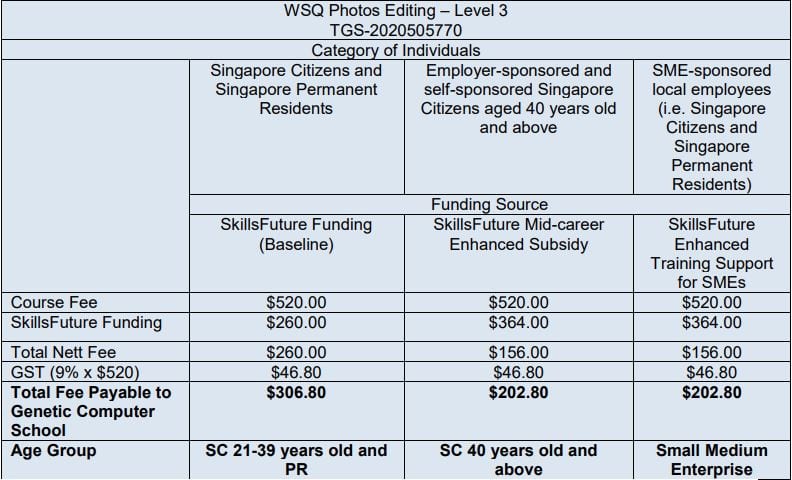
Eligible for Claim Period: 15 Sept 2020 – 14 Sept 2026
All fees are subject to prevailing GST of 9% (2024)
Visit the SkillsFuture Credit website Proceed to submit a claim.
Participant need to pass the test to get subsidy
SSG Advice:
Student must achieve 75% course attendance, and also pass the assessment to be eligible for SSG Funding.
All Singaporean aged 25 and above can use their $500 SkillsFuture Credit to pay for a wide range of approved skills-related courses.
Please refer to the below link for the Refund Table for SkillsFuture Courses:
https://www.genetic.edu.sg/refund-for-skillsfuture-courses/
PSEA Funding is available for student aged 18-30 years old (Please call PSEA Hotline 62600777 to check your balance).
We are pleased to share the the following information on the new PSEA Ad hor Withdrawal FormSG Application:
Using only own PSEA:
http://go.gov.sg/psea-withdrawal-tp
Using Sibling’s PSEA:
http://go.gov.sg/psea-withdrawal-tps