Course Objectives
This course is designed to equip you with essential knowledge and skills in visual collaterals production using mobile phones camera, photo editing apps and other apps. This course will also train you on the process of visual collateral productions, such as interpreting design brief, evaluating illustrations, and copyright issues..
Course Duration
16 Hours
Mode of Training
Classroom
Target Audience
Design for learners who want to learn how to assemble art assets/resources using mobile apps
Certification
Successful trainees will receive a Statement of Attainment (SOA) issued by SSG
At the end of the course participants will be able to:
-
Assemble art assets and resources using mobile apps to meet project requirements
-
Select appropriate mobile apps and equipment in accordance with project requirements
-
Develop illustration and graphics using mobile apps
-
Evaluate images, illustration and graphics created by mobile apps according to project requirements, copyright laws, regulations and clearance procedures
| SECTION |
DESCRIPTION |
| Section 1 |
Assembling art assets and resources
-Methods of interpreting design brief
-Take photo using mobile phone/tablet as part of art assets and resources
-Use mobile phone/ tablet to download and retrieve images from the internet
-Store and assemble appropriately assets and resources using mobile app through Office Lens |
| Section 2 |
Mobile apps and mobile equipment
-Various types of mobile apps required to meet design brief such as Instagram
-Use mobile phone/tablet to take photos
-Various creative elements in photography production
-Basic photo techniques and principles through Snapseed |
| Section 3 |
Illustration and graphics using mobile apps
-Develop illustration and graphic using Canva
-Various editing photos and cropping techniques
-Various methods to create illustration and graphics using basic editing principles |
| Section 4 |
Evaluate images, illustration and graphics
-Evaluate images, illustration and graphics according to project requirement
-Basic copyright laws pertaining on the use of photo, illustration and graphics |
Entry Requirement
-
Minimal education qualification is PSLE with 1 year of relevant working experience
-
Speak, listen and read English at a proficiency level not lower than the WPL Level 4, and manipulate numbers at a not lower than the WPN Level 4.
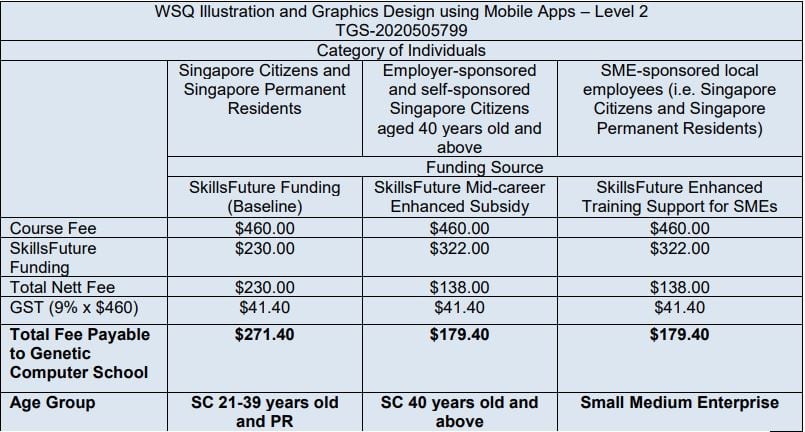
Eligible for Claim Period: 01 Oct 2020 – 30 Sept 2026
All fees are subject to prevailing GST of 9% (2024)
Visit the SkillsFuture Credit website Proceed to submit a claim.
Participant need to pass the test to get subsidy
SSG Advice:
Student must achieve 75% course attendance, and also pass the assessment to be eligible for SSG Funding.
All Singaporean aged 25 and above can use their $500 SkillsFuture Credit to pay for a wide range of approved skills-related courses.
Please refer to the below link for the Refund Table for SkillsFuture Courses:
https://www.genetic.edu.sg/refund-for-skillsfuture-courses/
PSEA Funding is available for student aged 18-30 years old (Please call PSEA Hotline 62600777 to check your balance).
We are pleased to share the the following information on the new PSEA Ad hor Withdrawal FormSG Application:
Using only own PSEA:
http://go.gov.sg/psea-withdrawal-tp
Using Sibling’s PSEA:
http://go.gov.sg/psea-withdrawal-tps