Course Objectives
This course is designed to understand benefits of higher productivity at workplace and facilitate implementation of productivity initiatives using collaboration apps and clouds services on the mobile devices.
Course Duration
16 Hours
Mode of Training
Classroom
Target Audience
Design for those who wish to use tablet/smartphone for productivity at workplace.
Certification
Successful trainees will receive a Statement of Attainment (SOA) issued by SSG
At the end of the course participants will be able to:
-
identify importance of using tablet/smartphone to increase productivity at workplace
-
facilitate implementation of using tablet/smartphone as part of productivity and process initiatives
-
review selected techniques and tools of using tablet/smartphone for workplace productivity improvement
-
provide feedback on ways of using tablet/smartphone to improve productivity and process
| SECTION |
DESCRIPTION |
| Section 1 |
Productivity through the use of tablet/smartphone
-Identify importance of productivity at workplace
-Importance of productivity through the use of tablet/smartphone
-Benefits of higher productivity at workplace
-Common productivity tools (e.g. SingPass, TraceTogether, ActiveSG) |
| Section 2 |
Productivity Implementation
-Facilitate implementation of using tablet/smartphone applications and productivity and process initiatives
-Factors affecting productivity improvement
-Need for productivity improvement through mobile apps and correct settings
-Common productivity tools (e.g. Google Map, My Transport, Google Translate |
| Section 3 |
Review of productivity techniques and tools
-Review tablet/smartphone techniques and tools for workplace productivity improvement
-Track productivity performance through cloud storage and synchronisation methods
-Methods of data collection
-Common productivity tools (e.g. DBS PayLah!, GrabPay, Carousell, Lazada, Shopee) |
| Section 4 |
Feedback on productivity and process
-Provide feedback of using tablet/smartphone to improve productivity and processes
-Types of productivity measurement
-Common productivity tools (e.g. Google Calendar) |
Entry Requirement
-
Minimal education qualification is Primary education without PSLE / PSPE certification or their equivalent.
-
Speak, listen and read English at a proficiency level not lower than the WPL Level 3, and manipulate numbers at a not lower than the WPN Level 3.
-
Ability to do typing.
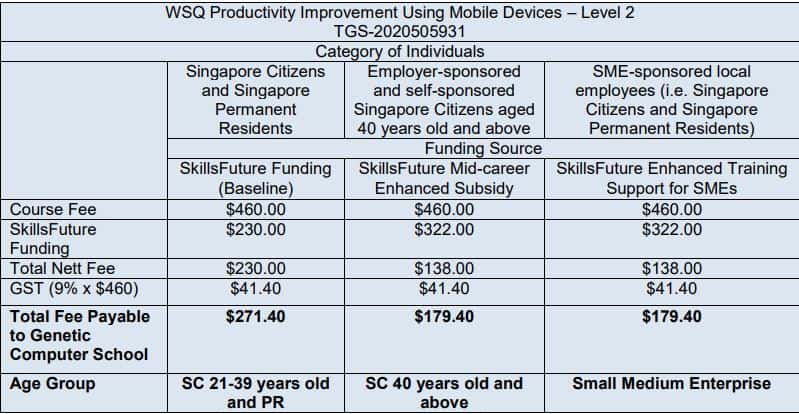
Eligible for Claim Period: 01 Oct 2020 – 30 Sept 2027
All fees are subject to prevailing GST of 9% (2024)
Visit the SkillsFuture Credit website Proceed to submit a claim.
Participant need to pass the test to get subsidy
SSG Advice:
Student must achieve 75% course attendance, and also pass the assessment to be eligible for SSG Funding.
All Singaporean aged 25 and above can use their $500 SkillsFuture Credit to pay for a wide range of approved skills-related courses.
Please refer to the below link for the Refund Table for SkillsFuture Courses:
https://www.genetic.edu.sg/refund-for-skillsfuture-courses/
PSEA Funding is available for student aged 18-30 years old (Please call PSEA Hotline 62600777 to check your balance).
We are pleased to share the the following information on the new PSEA Ad hor Withdrawal FormSG Application:
Using only own PSEA:
http://go.gov.sg/psea-withdrawal-tp
Using Sibling’s PSEA:
http://go.gov.sg/psea-withdrawal-tps